
Showing posts with label ubuntu. Show all posts
Showing posts with label ubuntu. Show all posts
Saturday, December 1, 2007


Linux: Tips for new Ubuntu installation
35 Cool Applications to install on Ubuntu
Google Desktop on Ubuntu
13 Must Do things on new Ubuntu installation
A Casual guide to some commonly used Linux Commands
Essential house keeping in Ubuntu
Installing libdvdcss2 and w32 video codecs in Ubuntu Gutsy Gibbon
Support for WMV, RealMedia and other formats has been bundled into the w32codecs package. This package is not available from the Ubuntu repositories due to licensing and legal restrictions.
For Ubuntu Gutsy Gibbon Users run the following command
sudo wget http://www.medibuntu.org/sources.list.d/gutsy.list -O /etc/apt/sources.list.d/medibuntu.list
Now you need to copy the key using the following command
wget -q http://packages.medibuntu.org/medibuntu-key.gpg -O-¦ sudo apt-key add -
Update the source list using the following command
sudo apt-get update
Install Codecs using the following command
sudo apt-get install w32codecs libdvdcss2
Using above download locations you can install most of the mutimedia codecs for ubuntu.
sudo apt-get update
Mplayer Plugin for Firefox
If you want to install Mplayer with plug-in for Mozilla Firefox run the following command
sudo apt-get install mozilla-mplayer
Friday, September 7, 2007
Clean Up Ubuntu Grub Boot Menu After Upgrades
To remove GRUB entries, we'll need to edit the file /boot/grub/menu.lst. You can do this by using Alt+F2 and then typing in the following command:
gksu gedit /boot/grub/menu.lst
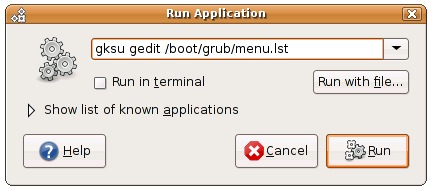
Now that we've got the file open, scroll down to the bottom of the file where it says "End Default Options", and you'll find all the menu entries for the various kernels in here. You can just select and delete the ones you want.
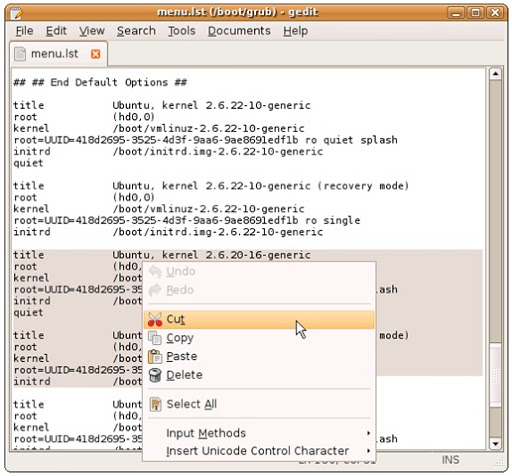
Save the file, and then the next time you boot up you'll see a much nicer set of options.
Comments:
No need to delete those lines to simplify the GRUB menu. The easier way to keep only newest lines is to open the menu.lst (gksu gedit /boot/grub/menu.lst), find "#howmany=all" and change it to "#howmany=1″. Then run "sudo update-grub" to update changes. Next time, only newest kernel lines will be shown.
Thursday, July 12, 2007
Bash Tutorial

Tuesday, July 10, 2007
Hotwire graphical terminal
 Free open-source app Hotwire is a GUI-based terminal with auto completion. Hotwire has most of the functionality of the bash shell tucked into an easy-to-use GUI. Intended to replace the Linux terminal, Hotwire is perfect for Linux beginners. Hotwire is a perfect way for new users to dip a toe into the terminal without diving in head first. Hotwire is a free download for Linux only. Ubuntu users can install Hotwire using:
sudo apt-get install hotwire
*Hotwire isn't in the Ubuntu repository. You have to download the .deb file from getdeb.net and install it manually.
This is also for Windows. See hotwire-shell.org
Wednesday, May 23, 2007
Monday, March 26, 2007
Beryl в Feisty
Установить Берил в последней версии Убунту стало еще проще
 Установите драйвер NVIDIA
Все - больше никаких переключений в виртуальную консоль и настройки параметров с помощ ью dpkg-reconfigure!
 Дайте серверу X знать, что вы требуете красоты
 Добавьте в список источников (Software Sources) эту строчку
 Обновитесь
 Установите Берил
 Хотите использовать свю тему GTK2 вместо Emerald?
 Занесите beryl-manager в Startup Programs в настройках вашей сессии, чтобы Берил автоматически запускался

Установите драйвер NVIDIAsudo aptitude install nvidia-glxВсе - больше никаких переключений в виртуальную консоль и настройки параметров с помощ ью dpkg-reconfigure!
Дайте серверу X знать, что вы требуете красоты sudo nvidia-xconfig --add-argb-glx-visuals --composite Добавьте в список источников (Software Sources) эту строчкуdeb http://ubuntu.beryl-project.org feisty main Обновитесьsudo aptitude update Установите Берилsudo aptitude install beryl Хотите использовать свю тему GTK2 вместо Emerald?gtk-window-decorator --replace & Занесите beryl-manager в Startup Programs в настройках вашей сессии, чтобы Берил автоматически запускался
Subscribe to:
Posts (Atom)